10/27/2015
Elephone M2 Smartphone with 3GB Ram & Touch ID Function
Elephone M2 Smartphone with 3GB Ram & Touch ID Function

Lenovo Table 2 A10-30. A cheaper version of the Tab 2 A10-70F
Lenovo will soon launch a new tablet – Tab 2 A10-30, which will become a cheaper alternative to the presented some time ago and tested by us Lenovo Table 2 A10-70F.
At the moment, the suggested retail price of Lenovo Tab 2 tablet A10-30 is not yet known but the tablet has already appeared on official website of the manufacturer so we have a full technical specifications and the official press graphics. For the smooth operation of the system Google Android 5.1 Lollipop will be responsible Qualcomm Snapdragon 210,whose four cores based on ARM architecture Cortex-A7 and were overclocked to 1.3 GHz (standard 1.1 GHz). Responsible for the graphics integrated Adreno 304 graphics chip and 1GB of RAM. On the data was booked 16 GB of onboard memory, and a microSD card reader. The system will be presented on a 10.1-inch display with a resolution of 1280 x 800 pixels. The matrix supporting 10-point touch is made with IPS technology and therefore offers wide viewing angles and good color reproduction. for communication, Lenovo Tab 2 A10-30 will answer the following modules: Bluetooth 4.0, WiFi wireless network module working in a standard 802.11 b / g / n, the fourth categoryLTE modem (optional), GPS with Russian GLONASS, as well as microUSB port. The quality of the sound will correspond to the sound bar speaker system with Dolby Atmos technology Moving Cinematic Audio, which allows for excellent sound reproduction. Technical specifications of Lenovo Tab 2 A10-30 with dimensions 171 x 247 x 8.95 millimeters and weighing 525 grams also includes a 5-megapixel main camera, dedicated camera video connections of the matrix 2 megapixels, and the battery capacity of 7000 mAh, which is to allow for about ten hours of continuous operation. Housing tablet is made of plastic and covered with white / blue paint. The "his back" in the top part there is a grill while the speaker.
Specifications of Lenovo Tab 2 A10-30
| LENOVO TAB 2 A10-30 | |||
|---|---|---|---|
| System | Android 5.1 Lollipop | ||
| Screen | 10.1 ", 1280 x 800 pixel IPS display | ||
| SoC | Qualcomm Snapdragon 210 quad-core – 4 x ARM Cortex-A7 1.3GHz | ||
| GPU | Adreno 304 | ||
| RAM | 1 GB | Built-in Memory | 16 GB |
| Card Slot | microSD | ||
| The camera | 5 megapixel | Camera | 2 megapixel |
| Battery | 7000 mAh | ||
| Work time | 10 hour | ||
| Communication | microUSB port, module Wi-Fi 802.11 b / g / n /, Bluetooth 4.0, GPS and GLONASS, the LTE modem (cat.4) to 150 Mbps single SIM card slot | ||
| Additional information | Dolby Atmos sound system Moving Cinematic Audio | ||
| Housing | Plastic | ||
| Dimensions | 171 x 247 x 8.95 mm | ||
| Weight | 525 g |
Gallery

Lenovo Tab 2 A10-30 / photo. Lenovo

Lenovo Tab 2 A10-30 / photo. Lenovo

Lenovo Tab 2 A10-30 / photo. Lenovo

Lenovo Tab 2 A10-30 / photo. Lenovo

Lenovo Tab 2 A10-30 / photo. Lenovo
Microsoft Surface Mini – the tablet that has existed and went on sale
In the previous year, Microsoft applied himself to sell its new tablet – Surface Mini. IPad Mini competitor but never went into mass production. Now we know that was real.
In the past year from the world of information technology reached on the proposed sale of new tablets of the Redmond giant. Among them was to find a smaller version of a device called the Surface Pro or Surface Mini. Although it has been canceled is one of Microsoft employees confirmed its existence in a recent interview to the site Wired. Recall that theMicrosoft Surface Mini was to be equipped with a display diagonal of 7.5 inches. As a result, Windows was to be presented at a resolution of 1440×1080 pixels. The image itself was to be displayed in 4: 3, while the computing power would provide the ARM unit. Release date was repeatedly pushed for further periods. We now know that Microsoft Surface Mini does not went on sale, but its existence was not just a fantasy. Moreover, almost all at that time was buttoned up. Mini was to appear on store shelves alongside the Surface Pro 3. In an interview to the site Wired, Microsoft employee – Panos Panay confirmed its existence. While the device was being prepared for sale, Panay used it on a regular basis. As he said – he was great and like moleskin. Sorry Surface Mini probably never will go to the official sales. Przyszyły rival the iPad Mini later that year had a set of accessories available to buy on the Chinese market, which was the best evidence of its imminent sale. There is no known cause of abandonment by the Redmond giant this project. Panay said that he loved to work with a small tablet. At the same time he was not able to say whether Microsoft will give him a second chance. This does not change the fact that the mythical Surface Mini existed and was on the way to mass production.Source: Wired
10/26/2015
iPad without secrets. Guide tabletManiaKa
You bought his first iPad and you're having trouble making full use of its potential? The guide tabletManiaKa find answers to important questions.
Freshly baked holder of the iPad, congratulations to purchase one of the coolest tablet I've ever tested! Now I explain to you that there is order in the world of Apple! Let's start from scratch, because without them we go any farther.
HOW TO SET UP A MAIL ACCOUNT FROM THE MAIL APPLICATION?
If you want to include your own account to the Mail application – Gmail or others – you have to enter in the settings and you'll find the Mail tab, contacts, and others. In it is the position account, where by clicking the Add account set up additional e-mail.
HOW DO I DOWNLOAD AN ATTACHMENT FROM THE E-MAILS?
If you use a mail using the Mail application, most attachments are automatically downloaded to the iPad, and you only need to decide which program to open it. All kinds of pictures are displayed in the body of email, while other files have the icon of the program, which has been associated by the iPad. After clicking on the icon will appear to us a context menu where you will find a list of programs to which you can copy the file.

fot. tabletManiaK.pl
HOW DO I SEND AN ATTACHMENT VIA E-MAIL?
All the files you want to send via e-mail attaching the application level, which allows the processing, reviewing or creating the file. If, for example. You want to send a document created on your iPad text from Word, you click on the Share button and then Send an attachment. A similar menu can be found in most programs installed on the iPad.
TO SEND A PICTURE?
Go to the Photos application, and then open the image you want to send. Click the Sharebutton in the upper right corner, then select the application Mail. Note that in this context menu, you can select more than one photo to attach. If you start with composing content and then you want to paste an image, press the longer the white box in the body of an email and then choose Insert photo or video.
One of the iPad, two users
CAN I USE TWO ACCOUNTS APPLE ID OR USER ACCOUNTS?
iPad is set to work with a single user, so it is not possible to log on to two different Apple ID accounts at the same time. You can log out temporarily from one account and log on second – thus draw on a borrowed iPad apps that you bought. Consequently, you can set up two user accounts on one device.
IS THERE A GUEST MODE ON AN IPAD?
iOS does not offer the option to run guest mode, but there is an alternative – supervised mode, through which we can limit the ability to use the iPad to one selected application from which you can not go out without a password set by us.

fot. tabletManiaK.pl
Tricks of the system
IS IT POSSIBLE TO PLUG IN A FLASH ON THE IPAD?
Yes, but you must use your browser's best Puffin Web Browser .
TO CLOSE AN APPLICATION?
To close an application, double-click the home button and slide open the window up. The application will be closed.
HOW TO ENABLE MULTITASKING?
Multitasking is active in all tablets are equipped with iOS 9. When you have already started a program, swipe from the right edge toward the center of the screen, and you will see the list of applications that run in multitasking mode.

fot. tabletManiaK.pl
HOW TO CHANGE THE WALLPAPER?
Go to Settings -> Wallpaper -> Select new wallpaper.
TO RECORD A SCREEN ON THE IPAD?
There are two ways – safer and less safe. If you have a current software or Quick Time Player, connect your iPad to your computer, launch QuickTime Player, and then click File -> New recording film and then with the Source, select the iPad.

fot. tabletManiaK.pl
HOW TO CLEAR YOUR BROWSING HISTORY?
Go to Settings -> Safari -> Clear History, and site data.
Data Synchronization
HOW TO SYNCHRONIZE DATA WITH THE PARTICIPATION ITUNES

fot. tabletManiaK.pl

fot. tabletManiaK.pl
HOW TO TRANSFER FILES FROM IPAD TO COMPUTER WITHOUT ITUNES?
Top-through clouds, for example. Dropbox. Install Dropbox or another disk in the cloud, then using this program, send it to cloud your chosen files and share share open the folder on your computer. The synchronization works both ways – from a Dropbox you a PDF copy, reproduce music file or save it to your iPad photo gallery.
HOW TO SHARE FILES WITH OTHERS?
You can, but not as much as you had time to get used tablet based on Android. Apple uses its own technology – AirDrop. To use it, the other person also has to have Your machine, unfortunately. How to do it? When you open the file you want to share press the button to share, and there will be devices on the network AirDrop nearby. You can always take advantage of the easier and more universal ways – put the photos or videos to Dropbox or send smaller ones via e-mail. Frankly, I mostly just using the mails. Here is a brief introduction to the iOS environment. I hope I helped a little bit – let us know in the comments! 
Obsidian inkBOOK reader with E Ink screen Carta and Android
Obsidian inkBOOK is the latest reader of books in electronic form, which is equipped with a paper Carta E Ink display technology Flat Glass Solution.
The use of E Ink technology provides higher contrast Carta presented content (about 50%) and about twenty percent more readable in bright sunlight, with respect to previous solutions used in the E Ink readers. Content is presented in resolution 1024 x 758 pixel touch screen with a diagonal six inches, which is another argument in favor novelty from the company Arta Tech. The density of pixels per inch is about 212. For any kind of data in the reader Obsidian inkBOOK working under the control of Google Android systemhas been booked 8GB of internal memory and microSD reader enables further extension by an additional 32 GB. It ensures smooth operation while the dual-core processor clocked at 1.0 GHz and 512 megabytes of RAM memory. E-book readers Onyx Obsidian inkBOOK is already available in Poland, at a suggested retail price fixed at 599 dollars. It can be found, among other things, in these stores: Agito, Komputronik, Media Expert, RTV Euro AGD or X-COM. In the near future Obsidian inkBOOK will also appear in the online bookstore Legimi where you can buy it at an advantageous offer subscription with unlimited access a rich database of e-books. a fragment press release.
SPECIFICATIONS ONYX INKBOOK
GALLERY

Galaxy View into the first store. We know the price and specification
Samsung Galaxy Tablet View is a real heavyweight. Colossus is already available in the offer of one of the shops, so that we can confirm information about its technical specifications and price.
Samsung Galaxy View is phablet equipped with an LCD display with a diagonal of 18.4 inches, which Android Lollipop will be presented in Full HD (1920×1080. Theoretically it is quite small value, but the practical application of this tablet is not likely to require a greater density of pixels per inch. Behind its performance will correspond to the 8-core Exynos 7580, supported by graphics chip Mali-T720 and 2GB of RAM. This seems to be an appropriate set to provide ago digitizer smooth operation. The unit does not run out of memory for user files. The manufacturer decided to provide potential users with 32GB internal memory which can be further expanded with memory cards of up to 128GB. Performance will provide energy battery with a capacity of 5700 mAh, which according to the manufacturer is to provide up to 8.5 hours of video viewing (it's quite an impressive result). Samsung also took care of the comfort of potential users by implementing enough of this huge tablet flexible stand that could allow support device or its handling. The success of this colossus sales will depend primarily on finding him specific applications, and these may not be too much. I would have seen it primarily an entertainment center, because it is not a hardware professionals. Important will also be its price, and this is jedak quite large, because the Samsung Galaxy View was valued by american store Adorama to $ 599 version of Wi-Fi, and the price variant of LTE is not yet known, but knowing life will be correspondingly higher. Sorry, we have no information about the availability in Poland, but would rather have it coming. But if so, it will inform you about this in a timely manner.
SAMSUNG GALAXY VIEW – TECHNICAL SPECIFICATIONS:
- Display:
- Processor: Exynos 7580 8-core unit clocked at 1.6 GHz,
- RAM: 2 GB
- Memory: 32 GB
- Camera: 2.1 megapixels,
- Battery: 5700 mAh
- Something for maniac: slot for memory cards up to 128GB,
- Communications facilities, Wi-Fi standard 802.11ac, Bluetooth 4.1, GPS, support for LTE technology in one of the variants.

Fig. androidheadlines

Quantum 700 1010 Mobile Pro and Mobile Pro. News GOCLEVER with Atom x3 and 3G
700 Quantum and Quantum MOBILE PRO 1010 MOBILE PRO is the first tablet in the range GOCLEVER that utilize the computing power of the Intel new generation – Intel Atom x3 and out of the box are controlled by Android Lollipop ..
In both models is responsible for the performance of 64-bit Intel Atom system x3-C3230RK composed of 4-core processor with a clock frequency of up to 1.2 GHz and 4-core ARM Mali GPU-450MP4 with support for OpenGL ES 2.0. The unit produced in 28-nanometer process technology has received support from 1GB of RAM. The data store is while the 8 GB built-in memory and a microSD card reader that supports cards up to 32 GB .. System Google Android 5.1 Lollipop in Q uantum 700 MOBILE PRO and Quantum MOBILE PRO 1010 is presented on the display with a resolution of 1024 x 600 pixels. GOCLEVER Quantum MOBILE PRO 700 has a 7-inch display with IPS technology, whileQuantum 1010 MOBILE PRO offer a potential buyer TN screen diagonal of 10.1 ". In both models will find a built-in 3G modem, wireless module working in a standard N, Bluetooth 4.0, GPS with GLONASS, a microUSB port with support for OTG (possibility of connecting external storage and pointing device) camera for video calling 0.3 megapixel, as well as 2-megapixel main camera.
SPECIFICATIONS GOCLEVER QUANTUM 700 MOBILE PRO

GOCLEVER Quantum 700 MOBILE PRO / photo. TabletManiaK.pl
SPECIFICATIONS GOCLEVER 1010 QUANTUM MOBILE PRO

Quantum GOCLEVER 1010 MOBILE PRO / photo. TabletManiaK.pl
Subscribe to:
Posts (Atom)
Featured Post
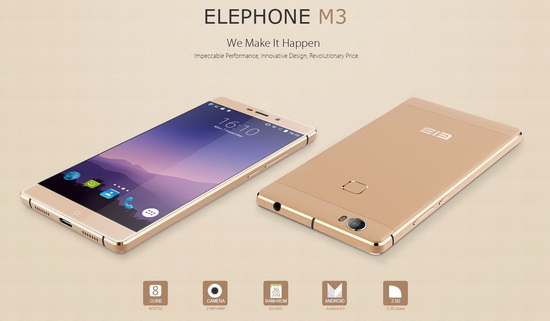
Elephone M3 News
Elephone M3 comes in two versions, both with the integration of aviation aluminum body and have Rose Gold, Champagne Gold, Smoky Grey ...