2/12/2019

Ways to Fix Slow Internet on iPad


Part 1: Why is My iPad so Slow on The Internet

If you are wondering why is my iPad so slow on the internet, there are chances that your iPad may not be the culprit for causing the slow internet connection. The modem or the router which you are using for the wireless connection may be malfunctioning. It is also possible that the signal strength or the internet speed of the Wi-Fi has reduced due to some technical glitches. The signal strength and internet speed problem maybe temporary and can be solved easily. There are high chances that many other applications are open in the background on your iPad which are consuming a lot of data due to which the internet speed has reduced altogether. If your iPad software is not updated to the latest version, even then there might be lag in the performance of the device as well as the internet speed. Apart from these there may be several hardware issues prevalent on your device which is causing the issue like the signal receiver.

There may be many reasons why your iPad internet is functioning slowly. To tackle all these issues refer to the points below and experience the normal internet speed on your iPad again.
Part 2: Tips & Tricks to Fix iPad Slow Wi-Fi

The solutions to fixing some of the common issues which lead to a lag in the internet speed on your iPad are given below. You can use these simple methods for easily fixing the issue of iPad slow Wi-Fi and start enjoying high internet speed on your iPad.
1. Restart Router

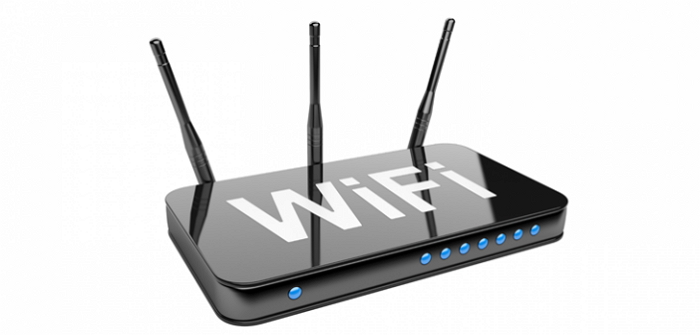
The first thing which you must do in such a situation is check the router or modem from which you are using the wireless network for internet. There may be possibility that there is some issue with this device.

You can simply restart the router or the modem, disconnect and again connect the wireless network on your iPad and check the internet speed again.


If this does not solve your problem of iPad running slow on Wi-Fi, then move on to the next step.
2. Forget the Network and Join Again

The connection of your iPad device to the wireless network may have got a bit messed up. To tackle this problem, refer to the steps given below.

Step 1: From the main screen of your iPad device, tap on “Settings” option.

Step 2: From the options on the left panel, navigate and tap on “Wi-Fi”.

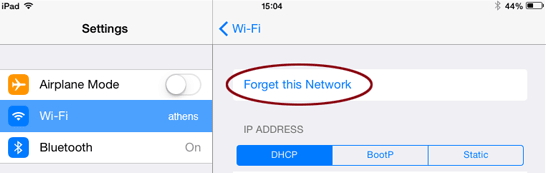
Step 3: Against your wireless network, there will be an “i” option, tap on that.

Step 4: Tap on “Forget this network”, after this, go back to the available Wi-Fi networks, select your Wi-Fi network and enter the password to join again.

3. Reboot Your iPad

If the above method does not work, you can try rebooting your iPad device. You can do that by following the steps mentioned below.

Step 1: Press the On/Off button and together pressing the home button.

Step 2: Keep holding it till the Apple logo appears on the screen.
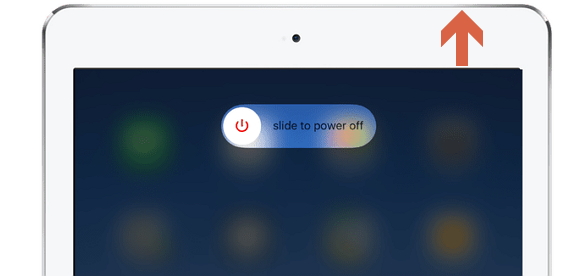


If you are using 12.9-inch iPad Pro, then press the power button with either the volume buttons. Once your device reboots, check the internet speed by connecting to the required network.
4. Reset Network Settings on iPad

You can even try resetting the network connection on your iPad device for the internet to start functioning normally again. To do this, refer the detailed steps mentioned below.

Step 1: From the main menu on your iPad Home screen, select “Settings” and then tap on “General” from the options available on the left panel.

Step 2: Navigate through the available options and tap on “Reset” and then on “Reset Network Settings”.
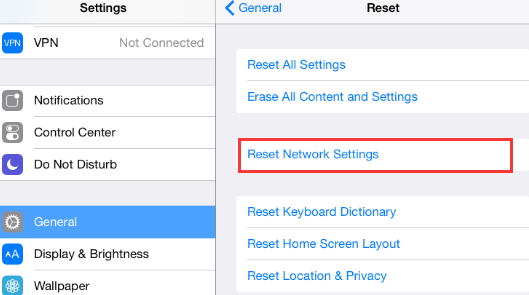


Once you enter the passcode, the network setting son your iPad will be reset. You can try connecting to the wireless network and check the speed again.

Sponsor ads:

Gihosoft Free iPhone Data Recovery:https://www.gihosoft.com/iphone-data-recovery-free.html

Gihosoft iPhone Data Recovery Free

Free iPhone Data Recovery Software for Windows/Mac

Recover up to 12+ types of files, including contacts, SMS, photos, WhatsApp, Viber, notes, etc.

Restore lost data from iOS devices directly or from iTunes and iCloud backup

Recover iPhone data lost due to iOS upgrade/jailbreak, accidental deletion, device lost or broken

Support all the latest iPhone, iPad and iPod Touch

Both Free and Pro version.

If you lost data after you updated to a new iPhone, you can always use Gihosoft iPhone Data Recovery to get the data back from the old iPhone or backup.You may also like: iphonerecovery.com

If you use android phones, please choose Gihosoft Android Data Recovery.

With Gihosoft Android Data Recovery, no longer afraid of data loss!

Must read:Youtube video downloader for pc

Gihosoft RePicvid Free Photo Recovery Software provides a free photo recovery software for windows to help users recover the deleted or lost photo for free.

Jihosoft Android Data Recovery: the best Android Data Recovery software for Windows and Mac to recover deleted contacts, messages, photos, videos, WhatsApp and etc from Android devices.Tips:How to transfer messages from iPhone to iPhone

jihosoft Free iPhone Data Recovery

2/01/2019

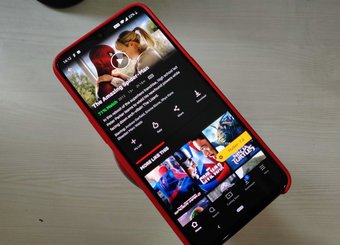
3 Must-Have Android Apps for Netflix Users 2019


1. FLUTTER

If you are an avid Netflix fan, you must know that Netflix tailors thumbnails as per your watch history. Imagine discovering an interesting movie thumbnail only to find that the movie was not worth it.


Don't you wish to view IMDB scores on Netflix easily? Mostly to figure out a particular movie's ratings and other details before investing our precious time in it.

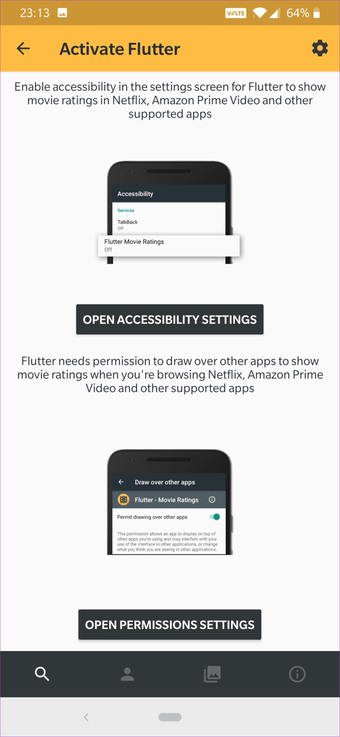
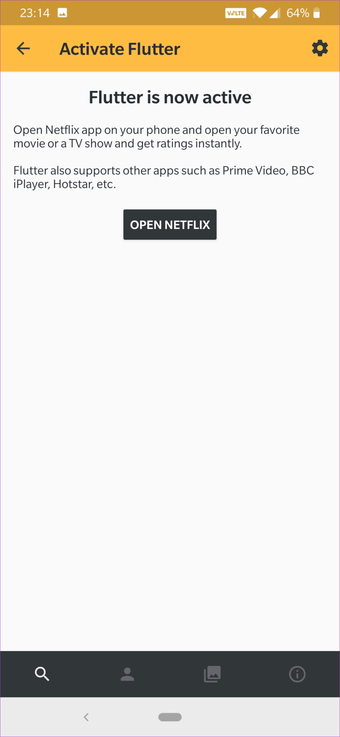
Flutter brings movie ratings within the Netflix app using a neat overlay wherein you see average rating as soon as you open a title. That's how the app makes it simple to see highest-rated content on Netflix.


This app sources movie ratings from IMDB, so you needn't worry since many consider it as a reliable source for Movies and TV shows ratings. However, Flutter requires access to Accessibility settings and Overlay permissions to work.


You can even find the trending movies and shows through the app. Just make sure to keep this app in the Not Optimized list under Battery Optimization.

Download Flutter
2. JUSTWATCH

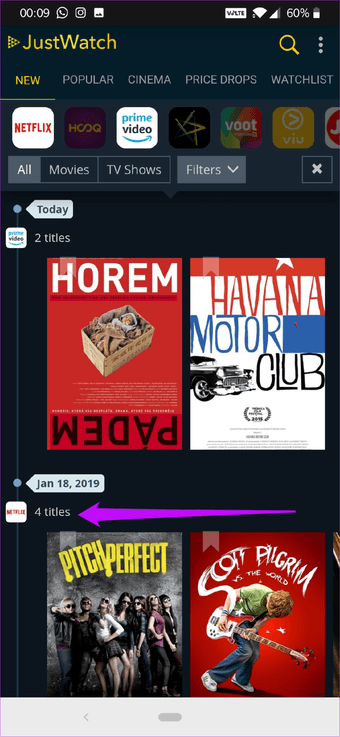
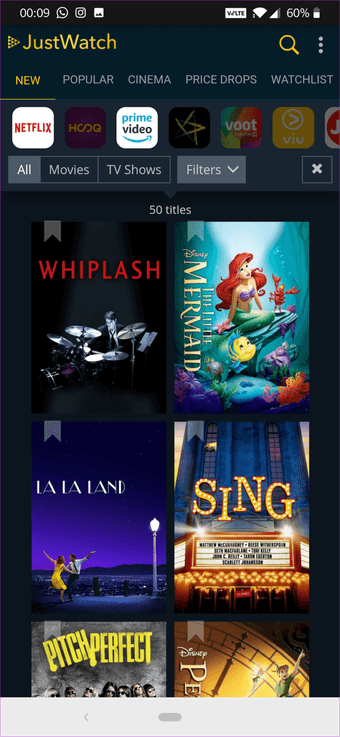
"What movie should I watch today" is perhaps one of the most common dilemmas of a Netflix user. Just Watch solves this issue through its catalog of all the recent additions to Netflix. Apart from displaying all the titles, it shows a timeline when a particular movie was added.


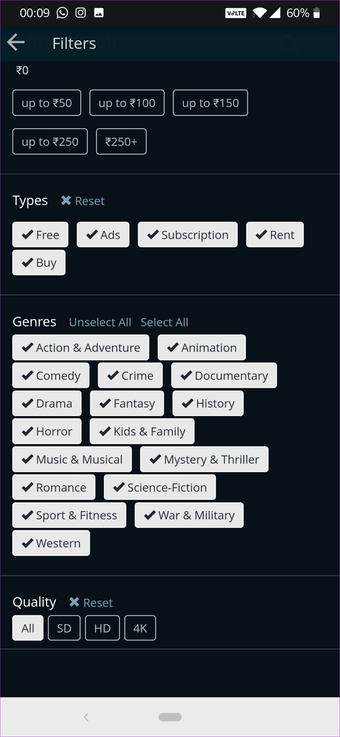
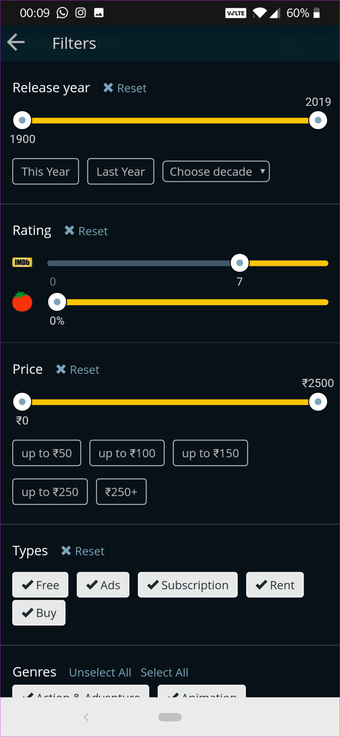
You can customize the search by specifying the average rating and type of movies you'd like to watch.


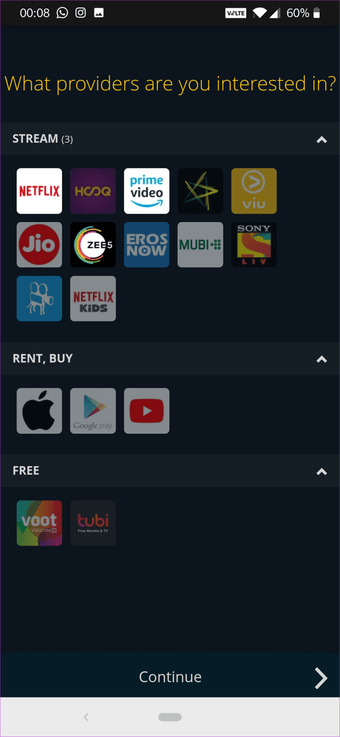
To use this app, you need to select the region and then the service — Netflix. Once done, the app will display all the new Netflix content. To filter the shows and movies, tap on Filter and customize it as per your liking.


Download JustWatch
3. RAVE

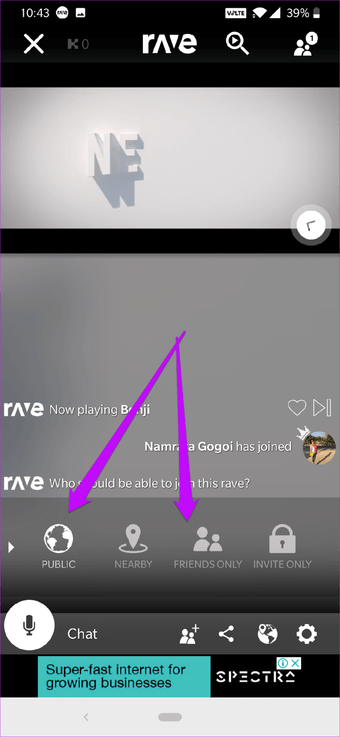
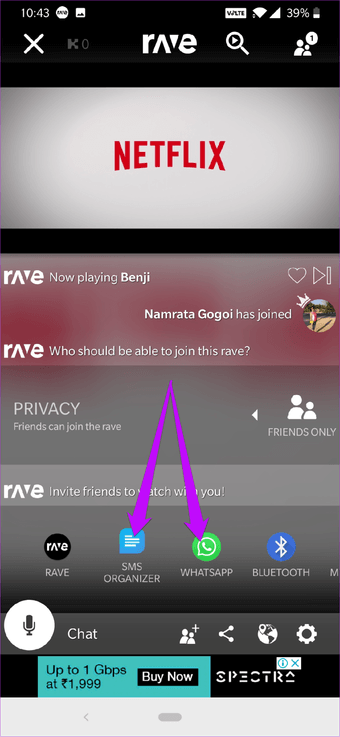
Rave takes community watching to an entirely new level. This little app lets you watch movies and shows with your friends even when they are not in the same city or country. All you need to do is invite someone with a valid Netflix account to your virtual party. Also, there are many public viewing streams that you can join.


This app replicates the Netflix home screen on your phone. Once you select a title, scroll down and tap on the Privacy > Friends, and share the link with your buddy over email or SMS.


Apart from the above features, Rave integrates chat just in case you want to have a quick word with your friend. Rave also supports a couple of other services like YouTube, History Channel, Vimeo and Liked.

You may face some latency issues, but not too annoying to spoil the fun.

NOTE: Both the parties need a working Netflix account for this app to work.

Download Rave

Sponsor ads:

Gihosoft Free iPhone Data Recovery:iphonerecovery.com

Free iPhone Data Recovery Software for Windows/Mac

Recover up to 12+ types of files, including contacts, SMS, photos, WhatsApp, Viber, notes, etc.

Restore lost data from iOS devices directly or from iTunes and iCloud backup

Recover iPhone data lost due to iOS upgrade/jailbreak, accidental deletion, device lost or broken

Support all the latest iPhone, iPad and iPod Touch

Both Free and Pro version.

If you lost data after you updated to a new iPhone, you can always use Gihosoft iPhone Data Recovery to get the data back from the old iPhone or backup.

Top 10 Best FRP Bypass Tools to Bypass Google Account on Android Device 2019

Worth reading:download youtube 1080p

Jihosoft Android Data Recovery: the best Android Data Recovery software for Windows and Mac to recover deleted contacts, messages, photos, videos, WhatsApp and etc from Android
If you use android phones, please choose Gihosoft Android Data Recovery

1/29/2019

7 Best Games Like Fortnite Mobile For Android 2019

7 Best Games Like Fortnite Mobile For Android 2019

But-but-BUT! Even with so much to offer there are still reviews saying that Fortnite mobile doesn’t work as smooth as their PC version. So, if you are facing the same issue or just want a change with your Fortnite play and want to try something else then you are just in the right place. As here is a list of 7 Best Games Like Fortnite Mobile For Android which will give you the same feel but with different and thrilling gameplay.

7 Best Games Like Fortnite Mobile For Android:


PUBG MOBILE


Garena Free Fire


RULES OF SURVIVAL


Bullet Force


Knives Out


Survivor Royale


Grand Battle Royale
1. PUBG MOBILE

If you are a shark in the gaming world or just a casual person who loves gaming then it is nearly impossible that you haven’t dive in the world of PUBG mobile. As it is the current hype of today’s youth. Be it on TV or on memes the game is literally everywhere! And honestly all because of the right reasons! As it is a highly competitive game where 100 players parachute onto a remote 8×8 km island and then the battle of the fittest begins! And after all the kills and survival the winner-takes-all showdown. So, do whatever it takes to survive in PUBG MOBILE, scavenge your own weapons, vehicles, and supplies, defeat every player and ultimately earn you Winner winner chicken dinner title!


Main Features:


High-quality Graphics and HD Audio.


Realistic Weapons.


Travel in Style.


Team Up with Friends.


Fair Gaming Environment.

Download PUBG
2. Garena Free Fire

Are you ready to survive in a battlefield with epic tasks and challenges? If yes, then Garena Free Fire is the perfect game for you! Now, the mission of the game is somewhat inspired by PUBG. As in this game, 50 players battle to the death on an enormous island full of weapons and vehicles. And only one player can make it off of this island alive. Now, game can be played in a 4 man squad with in-game voice chat for better communication. Or you can also play it solo with 49 other players who have came with the same mission as you! Apart from this, the game has easy controls and smooth graphics that will make your survival experience better and yet thrilling. So, turn your Android device into an isolated island and be the last man or in fact team standing with the Garena Free Fire game.


Main Features:


Realistic and smooth graphics.


4-man squad.


In-game voice chat.


Winter-themed UI.


Free to play.

Download Garena Free Fire
3. RULES OF SURVIVAL

RULES OF SURVIVAL is a Battle Royale game which has made its come back with a brand new arena. Where the deathmatch has now been raised to a thrilling epic scale! As the game now is fully upgraded with new 8×8 km map that allows 300 players to battle on a wide variety of terrains. But out of every player, there will be only one who will survive. Now, the game can be played in solo or team mode with a massive HD map for clear directions. So, download RULES OF SURVIVAL and come embark on a world-class battle royale now!


Main Features:


Massive HD map.


Solo or team mode.


A number of vehicles.


Different terrains.


Wide variety of firearms and accessories.

Download RULES OF SURVIVAL
4. Bullet Force

If you are someone who loves customized weapons and thrilling arenas then Bullet Force is just made for you. As it is a fast action 3D shooter game which provides you with the perfect combination of customized weapons and arenas! Now, the game includes over 20 weapons, 30 weapon camouflages, multiple optics, laser sights, and much more. In addition, you can play this game along with your friends in a 20-player war using a variety of weapons. Or just play it alone, as the game renders an offline mode too where you play with bots in a skirmish and campaign mode! Apart from this the game also provides with 4 game-modes and in each of them, you will be in combat against other players! So, prepare your weapons and work on your strategy to win in this first-person shooting game of Bullet Force.


Main Features:


Weapons Customization.


4 polished game-modes.


Awesome Custom Matches.


Offline FPS Feature.


Multiplayer Action.

Download Bullet Force
5. Knives Out

Jump into the ever-tightening arena and do what it takes to be the last one standing only in the Knives Out game! As in the game the world has now turned into a massive battlefield with 100 players in your way to win the ultimate battleship. So, what will you do to survive? Well, collect weapons, take aim, and pull the trigger and do whatever it takes to be the ultimate winner! Now, apart from this, the game has unique locations with Duo, Squad, and Fireteam Mode. So, select the one you prefer and start playing! But in every mode make sure you coordinate with your friends using in voice chat to crush your enemies in this deadliest Knives Out game where survival is the only objective!


Main Feature:


Unique locations.


Play with your own rules.


Massive battlefield.


Duo Mode, Squad Mode and Fire team Mode.


In game voice chat.

Download Knives Out
6. Survivor Royale

100 players, 1 battlefield only the fittest can survive in Survivor Royale. It is a game where 100 players are spread across a large map and they have to hunt for their weapons to beat the other opponents. But that’s not it, over the course of 20 minutes the playable area contracts, forcing survivors into a fight to the death of being the last man standing! Now, apart from this, the game is available in both solo and cooperative modes with realistic graphics, a wealth of weapons and forcing survivor! So, are you the best player who can survive till last? Well, find out this only in the Survivor Royale game!


Main Features:


HD maps.


A number of weapons and vehicles.


2- or 4-player modes.


Solo mode.


Sophisticated geography.

Download Survivor Royale
7. Grand Battle Royale

If you are someone who loves military blocky pixel games and battle royale games, then there are chances that you might also love Grand Battle Royale. It is a multiplayer online game where you need to survive in a long-dead island along with other opponents. Well, in the start all the players are unarmed but once the game takes a pace you must find various weapons and develop strategies to eliminate other players! Now, even though the concept of the game is somewhat similar to any other game on the list but hey this game, provides with hilarious blocky characters that can’t be seen anywhere! So, download Grand Battle Royale, and dominate the battlefield by taking on each opponent and become the last survivor!


Main Features:


Pixel Graphics & Blocky Characters.


PVP gameplay.


Fun pixel graphics.


HD audio.


Free to play.

Download Grand Battle Royale

So, above are the 7 Best free online games like fortnite Mobile that you can download on your Android device without any hassle. Now, don’t be surprised if you see Battle Royale games on the list. As Fortnite is, in fact, one of them. The thrilling gameplay of survival, scavenging for weapons, unarmed start and the elimination of opponents are all included in the above-mentioned games! So, what are you waiting for? Pick your preferred game or even “games” and get ready for the ultimate survival to be the last man standing!
Related Posts:


5 Best Android Emulators For Fortnite Mobile


5 Best Android Emulators for PUBG Mobile


7 Best Games like PUBG for Android

So, if you find this article helpful or interesting, share it on social media with your friends too. And also mention your views in the comment box below.

Sponsor ads:

Gihosoft Free iPhone Data Recovery:iphonerecovery.com

Free iPhone Data Recovery Software for Windows/Mac

Recover up to 12+ types of files, including contacts, SMS, photos, WhatsApp, Viber, notes, etc.

Restore lost data from iOS devices directly or from iTunes and iCloud backup

Recover iPhone data lost due to iOS upgrade/jailbreak, accidental deletion, device lost or broken

Support all the latest iPhone, iPad and iPod Touch

Both Free and Pro version.

If you lost data after you updated to a new iPhone, you can always use Gihosoft iPhone Data Recovery to get the data back from the old iPhone or backup.

Top 10 Best FRP Bypass Tools to Bypass Google Account on Android Device 2019

Worth reading:download youtube 1080p

Jihosoft Android Data Recovery: the best Android Data Recovery software for Windows and Mac to recover deleted contacts, messages, photos, videos, WhatsApp and etc from Android


If you use android phones, please choose Gihosoft Android Data Recovery.

1/21/2019

How to Make a Folder Password Protected 2019


How to Make a Folder Password Protected

You may sometimes wonder if there is a way to password protect a folder. Really, being exposed to overwhelming information nowadays, you must feel nervous not only for information bombing but also for the possibility that your personal information may be leaked to others by hackers or just be seen by others when you are away from the computer.

Sometimes you may just inevitably encounter the situation where you have no choice but to delete data and empty the recycling bin to prevent others from getting access to them. However, even though you do enough work for this, they are still retrievable. Because this is just like you throwing the rubbish into the trash and then throw it into the garbage dump downstairs. If the data you thought you have completely deleted are later “picked up” by some deliberate persons, then your personal information won’t escape from being leaked and even utilized.

Then to create a password protected folder to get files encrypted will be a good choice for you to save your nervousness. Now you may be wondering how to make a folder password protected on your computer. Well, please continue to scroll down this page and you will find what you want!
Part 1. How to Create Password Protected Folders without Third Party Software

If you want to know how to password protect a folder in Windows 10/8/7/XP/Vista, then this article will provide you with the detailed steps for encrypting folders on Windows computer. You’d better create a backup of the folders before you password protect them in case you forget your password accidentally later.
Please Follow the Steps Below:


Select the target folder you want to encrypt.


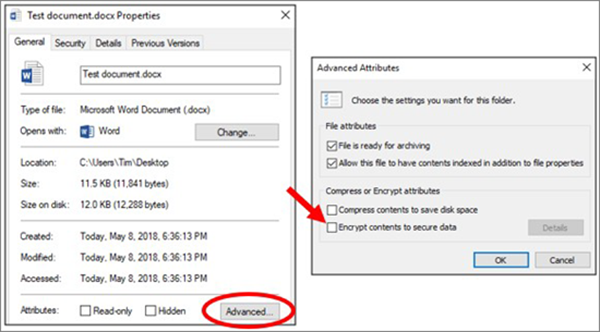
Right-click the folder and select “Properties”.


Click the “Advanced” button on the “General” tab.


Check the box for the “Encrypt contents to secure data” option, then click “OK” on both windows.


Note: If the “Encrypt contents to secure data” option is grayed out and couldn’t be selected or you just can’t find it at all, then the reason may lie in your Home edition of Windows which does not possess this feature. In addition, there is also another possibility that the hard drive where this folder is located is not formatted as NTFS for it is a requirement to the encryption feature.
Part 2. Password Protect Folders on Windows with File Encryption Software

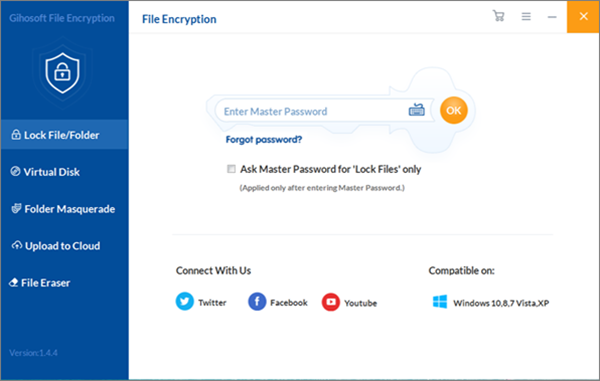
Well, to save a series of troubles for you, you are recommended to get the help of Gihosoft File Encryption. It is a password protect folder software which serves as an alternative to Encrypting File System (EFS) of Windows, and this software makes it more convenient to create a password protected folder on PC.

To password protect folder on your computer, you can follow the steps below:


Run the software on PC, and then you should enter the master password to make sure you can use its functions normally.


First click on “Lock File/Folder” feature. Next click on “Select Items” and then select “Add Folder” option from the drop down box to add your target folder here. Or you can also complete this process by clicking the symbol + in the middle of this page.


After that, this folder will disappear from its original location and you can see it listed on the page of this software. When you need to access the encrypted folder, just select this folder first and then click on “Un-Protect” or “Unlock” option to recover its former location. Attention! When you click on “Un-Protect” option, the listed folder won’t be removed from this software page; when you click on “Unlock” option, it will be removed form this page.

I guess this article can certainly help you a lot! So you can share it with your families or friends to help them solve similar problems too! And welcome to leave your precious messages in comment area below!

Gihosoft Android data recovery Free is a super awesome software specialized in Android file recovery. With this program, you are able to recover deleted photos, music, videos, messages, contacts, call logs, WhatsApp messages, Viber chat history and more from Samsung, Huawei, LG, HTC, Motorola, Google, Oneplus, Sony, Lenovo, ZTE and other Android devices directly.

Gihosoft iPhone Data Recovery Free

Free iPhone Data Recovery Software for Windows/Mac

Recover up to 12+ types of files, including contacts, SMS, photos, WhatsApp, Viber, notes, etc.

Restore lost data from iOS devices directly or from iTunes and iCloud backup

Recover iPhone data lost due to iOS upgrade/jailbreak, accidental deletion, device lost or broken

Support all the latest iPhone, iPad and iPod Touch

Both Free and Pro version.

If you lost data after you updated to a new iPhone, you can always use Gihosoft iPhone Data Recovery to get the data back from the old iPhone or backup.

1/06/2019

Fix iMessage not working on iPad


Problem 1: iPad not Sending/Receiving Text Messages

iMessage is a service that Apple users can use to exchange messages with fellow Mac, iPhone and iPad users as long as you have a good internet connection. Messages sent through iMessage are shown in a blue bubble while regular text messages appear as a green bubble.

But somehow if your iPad ipad message not delivered/received as usual, it can be quiet a problem. Some helpful solutions are given below.
1. Check Your Internet Connection

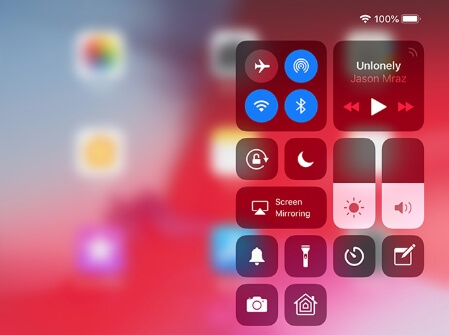
Usually it is because you aren’t connected to the internet. iMessage can only be sent/received when your iPad is connected to the Wi-Fi or personal hotspot. Sometimes you may accidentally hit your Airplane mode option and be bamboozled as to why you can’t get any messages, or your internet connection might be down. If you notice this problem, you can simply fix it by reconnecting Wi-Fi or disabling Airplane mode on the control center.


2. Make Sure You’ve Activated iMessages

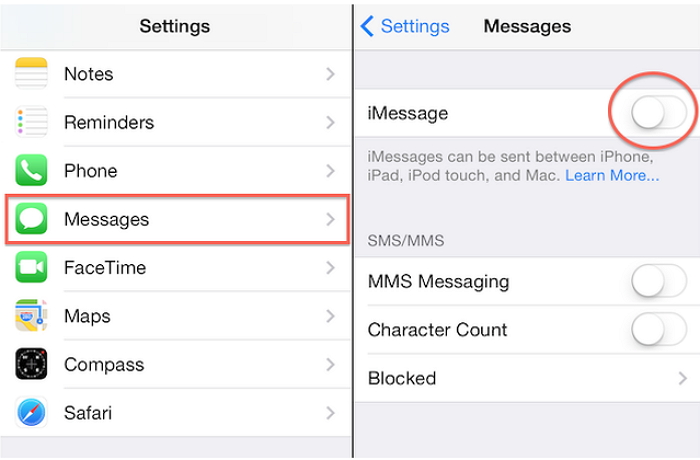
Before you can start using iMessage on iPad, you need to set it up in Settings. Process to activate iMessages is given below:


Launch Settings from your home screen.


Tap Messages.


Tap the iMessage On/Off switch. The switch will be green when it's been turned on.


3. Restart your iPad

It is likely that you are facing this issue because of some application that might be taking up most of the RAM, making other processes harder to run.

Simply restarting your iPad by holding the power button and drag the slider will fix this issue because it will turn off all of the processes that run in the background.


4. Sign out of Apple ID and Sign in Back Again

Your iMessage works with the Apple ID you are using at the device. Usually if your iPad is not receiving text messages it is because either you ID has been signed out or hasn’t been synced properly, probably because of connectivity issues.

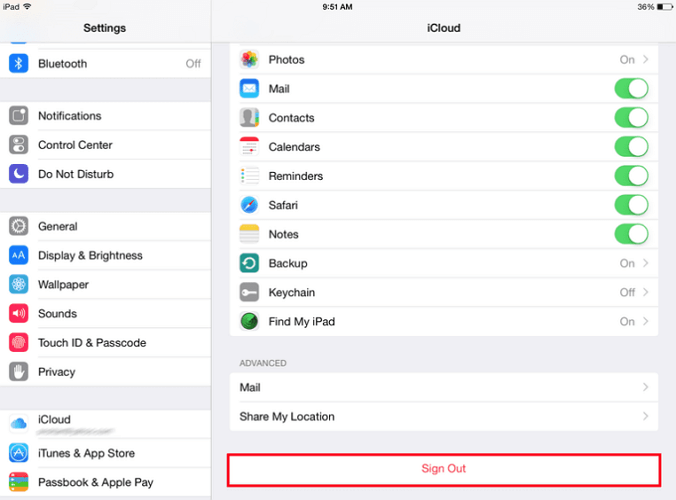
As a solution to this issue you would have to sign out of your Apple ID and sign back in. Here’s how to do it:


Open the Settings app in iOS and head to your name.


Scroll down and find Sign Out option.


Enter your Apple ID password and tap Turn Off.


Decide whether to keep a copy of your data or delete them.


Tap Sign Out again to confirm.


After that, wait for a while and sign back in with the same Apple ID by entering your email and password.


Problem 2: Error Occurred When Activate iMessage

To use iMessage on your device you need to activate it on your iPad. Sometimes, you can come across an error message during activation process, for example:


An error occurred during activation


Waiting for activation


Activation unsuccessful


Could not sign in, please check your network connection


If you see the error message during activation, here are a few solutions you can follow:
1. Check Time Zone Settings

The first solution that you can try to fix an iMessage activation error is checking the time zone settings. There are certain cases where users have incorrect time and due to which the activation fails. To manage your time zones, follow the steps below:


Go to Settings app.


Tap General > Date & Time


Make sure your time zone is set correctly


2. Wait for 1 Day

Sometimes, it takes almost 24 hours for the activation process to fully complete. If you are facing errors initially, give the activation process a day and see if it completes successfully, if not, follow the other steps.

Sponsor ads:

Gihosoft Free iPhone Data Recovery:https://www.gihosoft.com/iphone-data-recovery-free.html

Gihosoft iPhone Data Recovery Free

Free iPhone Data Recovery Software for Windows/Mac

Recover up to 12+ types of files, including contacts, SMS, photos, WhatsApp, Viber, notes, etc.

Restore lost data from iOS devices directly or from iTunes and iCloud backup

Recover iPhone data lost due to iOS upgrade/jailbreak, accidental deletion, device lost or broken

Support all the latest iPhone, iPad and iPod Touch

Both Free and Pro version.

If you lost data after you updated to a new iPhone, you can always use Gihosoft iPhone Data Recovery to get the data back from the old iPhone or backup.You may also like: iphonerecovery.com

If you use android phones, please choose Gihosoft Android Data Recovery.

With Gihosoft Android Data Recovery, no longer afraid of data loss!

Must read:Youtube video downloader for pc

Gihosoft RePicvid Free Photo Recovery Software provides a free photo recovery software for windows to help users recover the deleted or lost photo for free.

Jihosoft Android Data Recovery: the best Android Data Recovery software for Windows and Mac to recover deleted contacts, messages, photos, videos, WhatsApp and etc from Android devices.

jihosoft Free iPhone Data Recovery
Tips:

How to transfer messages from iPhone to iPhone

12/12/2018

7 Apps to Book Movie Tickets Online in India 2019


1. BookMyShow

With BookMyShow app you can now book tickets for movies, plays, concerts, sports and many other events happening in your city. You can book and buy tickets online. The app lets you check movie show timings, list of theatres, read reviews and news. Movie bookings now made very easy. This app is one stop destination for all your ticketing and entertaining shows. Over the years, this app has catered to millions and have strived in becoming Indias number 1 online entertainment portal. The app has a tie-up with most of the renowned cinemas in the country like PVR Cinemas, BIG Cinemas, INOX, City Gold and so many more. If you are a movie buff then this is the right place for you to book your movie tickets without any trouble. They also curate the best of events in the country and provide you a great service. If you are of a kind who enjoys dramas they have got you covered with the best plays happening in your city. If you want to be amongst the first few to get notified about your favorite event then this app is where you need to be. BookMyShow is the best movie booking app in India.


Main Features:


Book and buy movie tickets online.


Bollywood, Hollywood, Tamil or Telugu movie shows.


Book events.


Great offers/discounts.


Privacy ensured.

Download the App
2. Paytm

Paytm is India’s Number 1 wallet and payment app with over 200 million users. It is simple to send and receive money, with this app. Also, it has a great feature that lets you nook movie tickets with no fuss. Whether you are a Hindi movie or Hollywood fan, you can book movie tickets online for the latest and upcoming movies across various theatres. With Paytm, you also get great cashback on every movie you book. You can also book tickets for Events, Amusement Parks, Water Parks, and Theme parks. Add money to your Paytm wallet and book tickets for your awaited upcoming movie. This app makes booking tickets a simple job!


Main Features:


Mobile Recharge & Bill Payment.


Money Transfer.


Water, Gas & Electricity Bill Payment.


Entertainment: Movie Tickets, Amusement Parks & Events.


Deals.

Download the App
3. PVR Cinemas

The all-new PVR app makes your movie booking experience easy and hassle-free. You can buy your tickets on the app, stay updated with movie information, movie schedule, coming soon/upcoming movies, show timing, prebook food and seats and get many more exclusive loyalty benefits. It has easy discovery and booking of tickets and food. They have improved the navigation to help you seamlessly book your movie tickets, food, find the best offers and to make it easier to book the experience. The app lets you discover movie recommendations, food suggestions, seat preference and many more surprises tailored just for you. You can also book a cab in the app itself for your movie trip. They have teamed up with Ola to bring you the best taxi service available. You can also get traffic updates from your saved location to PVR cinemas. So that you reach on time and don’t miss even a moment of the movie you are planning to watch. Apart from all this choose from a number of payment options to pay for your ticket. There is also a PVR privilege which rewards you on every transaction you make. With PVR Privilege membership you get birthday bonuses, invite to exclusive events and premieres and more.


Main Features:


Improved Navigation.


Show End Time info.


App Personalization.


Cab booking.


Ticket Cancellations.

Download the App
4. INOX

Everything you love about INOX now is at your fingertips in the form of INOX app. You can easily find and search about what is playing at your nearest INOX theatre. Book tickets instantly inside this app. You can also use the app to order food and beverages directly from your seat. Don’t wait in line, let the food come to you. You can also give your loved ones the gift of entertainment by gifting them an INOX E-Gift card. Get movie listings, check showtimes, choose your seats and buy the ticket directly from your phone. Also, INOX application supports multiple payments options which are 100% secure.


Main Features:


Get cinema and movie listings.


Check showtimes.


Choose your seats.


Buy tickets.

Download the App
5. Cinepolis India

Cinepolis India brings cinema right in the palm of your hands. Check the show timings, find trailers and buy your ticket at any place at any time. You can view the timing of the movie shows being played around you. Also, locate a cinema hall that is closer to you. Quickly and easily find the movie that you want to see. All in one app in one place! You need to have an active internet connection in order to enjoy the various features of the app. Now booking movie tickets is a three-step process and not a long queue.


Main Features:


Show Time.


Location.


Search.


Tickets. Sponsor ads:


Gihosoft Free iPhone Data Recovery:https://www.gihosoft.com/iphone-data-recovery-free.html


Gihosoft iPhone Data Recovery Free


Free iPhone Data Recovery Software for Windows/Mac


Recover up to 12+ types of files, including contacts, SMS, photos, WhatsApp, Viber, notes, etc.


Restore lost data from iOS devices directly or from iTunes and iCloud backup


Recover iPhone data lost due to iOS upgrade/jailbreak, accidental deletion, device lost or broken


Support all the latest iPhone, iPad and iPod Touch


Both Free and Pro version.


If you lost data after you updated to a new iPhone, you can always use Gihosoft iPhone Data Recovery to get the data back from the old iPhone or backup.You may also like: iphonerecovery.com


If you use android phones, please choose Gihosoft Android Data Recovery.


With Gihosoft Android Data Recovery, no longer afraid of data loss!


Gihosoft RePicvid Free Photo Recovery Software provides a free photo recovery software for windows to help users recover the deleted or lost photo for free.


Jihosoft Android Data Recovery: the best Android Data Recovery software for Windows and Mac to recover deleted contacts, messages, photos, videos, WhatsApp and etc from Android devices.


jihosoft Free iPhone Data Recovery


Worth reading:Best youtube downloader online download youtube 1080p


Download the App
6. Maxus Cinemas

The new Maxus Cinemas application for Android is now available for Free! You can search for movies based on language and genre and preference. You can check the movie timings in the app itself and also the summary too. You can also book you favorite or preferred seats in the app. There is also a payment o[ption in the app which lets you pay without any hassles.


Main Features:


Movie and cinema listing.


Multiple payment options.


Choose seats.


Buy tickets.

Download the App
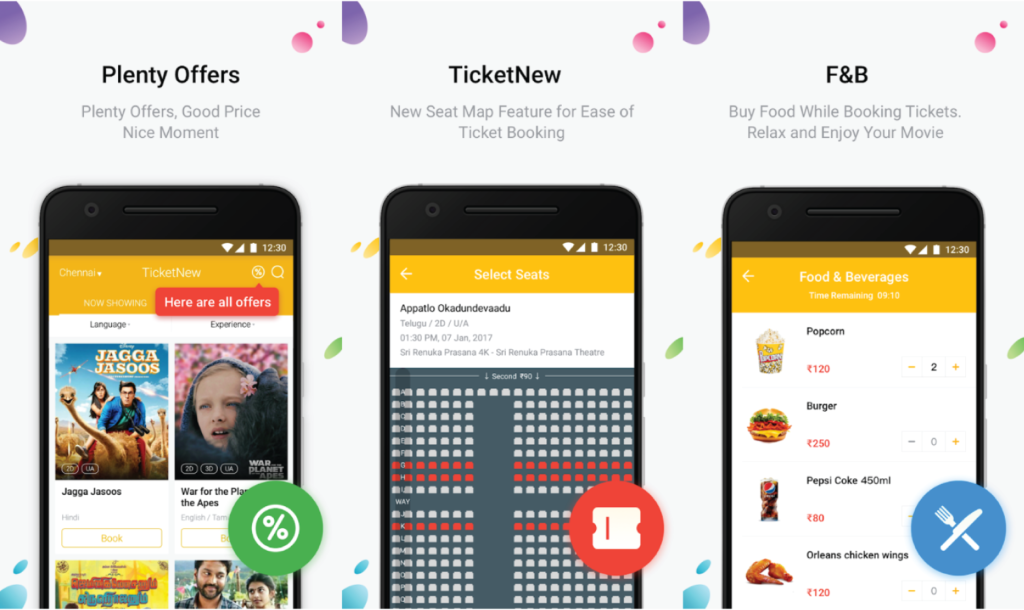
7. TicketNew

TicketNew is the best and latest place to check for movies and cinemas around you. Booking ticket is now an effortless, fun and exciting experience for everyone. No more standing in long lines just downloads TicketNow and you are sorted. Book your tickets using your Android devices. This app works for more than 80 cities in India like Mumbai, Pune, Banglore, and Kolkata. The app uses your location data to show you venues around you. No data that is obtained is ever collected by the servers. This app also gives you a plethora of discounts that you can get by booking tickets from this app.


Main Features:


Book tickets.


Over 80 cities covered.


Fun and exciting.

Download the App

These were our picks for the Best apps to Book Movie Tickets in India. You can choose any app that caters to your need. These apps are completely free to use.

11/16/2018

5 Best OCR Apps For Android To Copy Text From An Image 2019

Using your smartphone to scan documents is not something new. Now, this has become common and also very essential. So whenever you need to digitize any printed text as it is very safe to go paperless and maintain a soft copy. There are several online OCR tools but nothing beats the convenience that you get when you have such a tool on your Android device itself. There is a wide range of apps on the Play store that can help you out with that. But if now the question in your mind is what app to use or what exactly should I look for? Then fret not, we have put together this list just for you! In this post, we will go through the Best OCR Apps for Android that you can download from the Playstore For FREE.


Best OCR Apps For Android To Copy Text From An Image:


Google Lens


Adobe Scan – PDF Scanner, OCR


Text Scanner (OCR)


Text Fairy (OCR Text Scanner)


OCR Text Scanner: Convert an image to text
1. Google Lens


Google Lens, this app is curated by the giant Google itself which means its build for perfection. It is a certified application that works fine. Its fast and does what it says which definitely makes it the best app. Google has truly mastered Optical character recognition, be it in Google Keep, Drive or other apps. Even in Google lens the text recognition and selection is remarkable. And thanks to OCR Google Lens also recognizes phone numbers and email addresses on the images. Make your life easier, download Google Lens now!


Main Features:


Take action on a text.


Find similar clothes, furniture, and home decor


Capture and share ideas.


Explore popular landmarks.


DOWNLOAD THIS APP
2. Adobe Scan-PDF Scanner, OCR


Adobe Scan turns your mobile into a smart scanning tool making it easier to create digital documents from anywhere. Adobe Scan captures images into a snap and transforms them into brilliantly clear Adobe PDFs with the text you can reuse. Its fast and easy to capture multipage documents too. Other apps limit the number of pages you can scan but Adobe gives you the freedom to scan as many pages you like. The scans are saved in the Adobe Document Cloud and they are always available to you whenever you might need them. Whether you are a student or office person or a lawyer Adobe Scan will help you digitally transform your life.


Main Features:


Scan anything.


Save business cards.


Get more done.


Recycle content.


Find documents.


DOWNLOAD THIS APP
3. Text scanner [OCR]


With the most accurate OCR algorithm Text Scanner {OCR} is one app that combines functionality and simplicity together. With the highest speed and highest quality, this app might be the one your phone needs. Now no need take the trouble of copying written notes or data just use this app and make your life simpler and better. It supports over 50 languages and also supports handwriting. It will save you a lot of time and work too. With this application conversion of any papered document can be done into a soft copy document in a matter of seconds. The usage of this app can ease your corporate or college/school life.


Main Features:


Highest speed reading.


More than 50 languages.


Highest accuracy reading.


Support handwriting.


Recognizes text.


DOWNLOAD THIS APP
4. Text Fairy


Text Fairy is one of the best OCR apps out there. It does one thing and does it to perfection. It will simplify your life. It provides you with the option of converting your hardcopy text into a digital file by extracting the text. This app also allows you to copy text from the clipboard of your phone instantly for use in any other external third party like email and messaging apps. The best part of the app is that it recognizes over 50 different languages and that’s a lot! It also gives you the option of converting the extracted data directly into text or a pdf file. Its an all rounder app for your OCR needs.


Main Features:


Convert image to text.


Edit extracted text.


Convert the scanned page into PDF.


Recognizes printed text from more than 50 languages.


No Ads.


DOWNLOAD THIS APP
5. OCR Text Scanner


Modern technology is wonderful, take a scanned image or take a snap using a mobile camera and OCR Text scanner extracts all the information from the image into an easily editable text format. This app has over 95-100% accuracy in reading/scanning texts. It turns your mobile into a text scanner and translator. It supports over 100 languages and enables you to crop and enhance your image before OCR. You can easily save, share and edit your OCR result very easily.


Main Features:


Extract Text On Image.


Copy – Text on Screen.


Edit & Share OCR result.


Scan history.


Translate text to over 100+ languages.


DOWNLOAD THIS APP


This was our list of the Best OCR Apps for Android, although there is no shortage of OCR Apps on the Google Play Store, the above-mentioned apps are quite easy to use and have all the functions that you need. Some of the apps are designed especially for converting images of handwritten notes to text while others do a lot more. In the end, the choice is yours to make. So download the one that meets your criteria and is effective for you. If you have any app suggestions or want us to cover any topic then comment it down below.


Sponsor ads:


Gihosoft Free iPhone Data Recovery:https://www.gihosoft.com/iphone-data-recovery-free.html


Gihosoft iPhone Data Recovery Free


Free iPhone Data Recovery Software for Windows/Mac

Recover up to 12+ types of files, including contacts, SMS, photos, WhatsApp, Viber, notes, etc.


Restore lost data from iOS devices directly or from iTunes and iCloud backup


Recover iPhone data lost due to iOS upgrade/jailbreak, accidental deletion, device lost or broken


Support all the latest iPhone, iPad and iPod Touch


Both Free and Pro version.


If you lost data after you updated to a new iPhone, you can always use Gihosoft iPhone Data Recovery to get the data back from the old iPhone or backup.You may also like: iphonerecovery.com


If you use android phones, please choose Gihosoft Android Data Recovery.


With Gihosoft Android Data Recovery, no longer afraid of data loss!


https://www.gihosoft.com/android-data-recovery-free.html


Featured Post

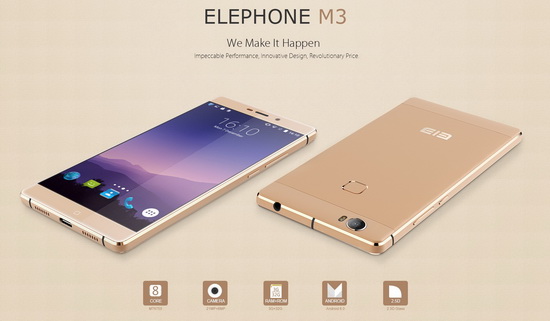
Elephone M3 News

Elephone M3 comes in two versions, both with the integration of aviation aluminum body and have Rose Gold, Champagne Gold, Smoky Grey ...